On Wednesday, October 28, Santa Cruz Works hosted its latest CEO Works Luncheon, “Asking the Right Questions: User Research on a Startup Budget.” Local founders and business leaders came together over lunch to dig into a challenge every company faces, especially in the early stages: understanding what customers actually need when time and money are tight. The conversation focused on practical, affordable ways to gather meaningful feedback, avoid building the wrong thing, and turn customer insight into smarter decisions. Here’s a recap of what we learned, written by the presenter, Kelea Liscio.
“We don’t have time for research”
“Build stuff and talk to users” is the founding advice of Y Combinator. But once a company gains traction, setting aside time for research is easier said than done. And with AI that enables teams to move from concept to beta test in less than a week, Research can feel too slow.
Subscribe
Time: Research feels like time taken away from product development at a moment when everything is shipping faster than ever.
Cost: Research can feel expensive in terms of the vendors, tools, and time founders spend talking instead of building.
But the most expensive part isn’t the time or the cost.
It’s asking the wrong questions.
Ask the wrong questions and you can walk away from research with nothing useful, or worse, get results that lead you confidently in the wrong direction. As a study of failed startups found, the most common reason was “no market need”—building something people didn’t need.
The good news: asking the right questions is fast and affordable. Most studies only require a small number of conversations with tools you already have.
The most critical questions for each stage
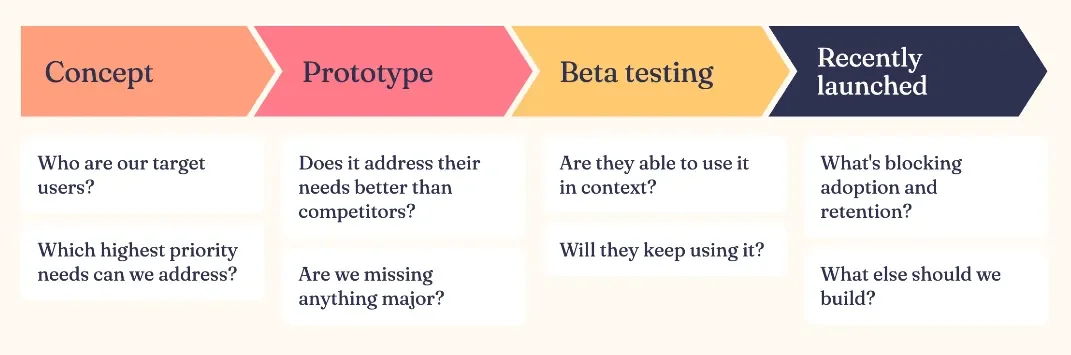
The questions you need to answer change at every stage of product development. There are only a few that really matter at each one, and they’re similar for most companies, whether hardware or software, B2B or B2C, across any industry.
For early stage startups, these are the critical questions for building the company as a whole.
For established companies, they apply to each new big bet, like a new major AI feature, product line, user base or pricing change. Not every button and settings page.
Rule of thumb: the more expensive or risky it would be to get something wrong, the more of this research you need to do along the way.
These aren’t the questions you ask your users directly. They’re what your research needs to answer. For example, you’d never ask a user “What’s blocking your adoption?” Rather, you’d watch them try to use the feature, and ask things like “Where would you go to find this?”
Stage 1: Concept
Questions:
Who are our users?
What are their highest priority needs that our product can address?
What you’re deciding: Whether to build this at all. Get it wrong and you’ll spend all your time and money building something no one needs.
Approach:
Stage 1: 1:1 interviews with 5–6 target users per segment, ideally in the context where they’d use the product. You’re trying to understand how they currently solve the problem you want to fix, and the pain points they run into along the way.
Stage 2: A quick survey to confirm the people you talked to aren’t outliers, and that their pain points hold up at scale. It’s the one method that can be a bit more expensive, but it’s critical to get this piece right.
Pitfall: Asking whether they’d use or pay for your hypothetical concept.
Why you could get the wrong answer: You could walk away thinking users love your concept when (without a prototype in front of them) the product they’re picturing is completely different from the one you’re envisioning. And people are notoriously bad at predicting what products they’ll use in the future.
Stage 2: Prototype
Questions:
Does it address their needs better than their current approach?
Is anything major missing?
What you’re deciding: What goes into the MVP.
Approach: 1:1 sessions with 5 target users. Put the prototype in their hands and have them try to address their need with it.
Pitfall: Showing users how to use it.
Why you could get the wrong answer: You could walk away thinking people can find and use the features they need, when without you there to guide them they can’t figure it out. You won’t be in their house or office to walk them through your product once it launches, so don’t do this in your research either.
Stage 3: Beta
Questions:
Are they able to use the real product in context, in their own lives?
Will they keep using it?
What you’re deciding: Whether you’re ready to launch. Get it wrong and people try it once and abandon it.
Approach: A diary study with 5 users over about a week, collecting daily feedback with tools you already have, like email or Google Forms.
Pitfall: Not capturing data over enough time (e.g. after one use)
Why you could get the wrong answer: You could walk away thinking your product meets their most pressing needs and that people will continue using it after the first time. In reality, it may be too challenging to use or lack the right features so much that they return to their current process after a day.
Stage 4: Recently launched
Questions:
What’s blocking adoption and retention?
What else should we build?
What you’re deciding: Where to focus engineering effort next.
Approach:
Part 1: Usage logs show the “what”: where people drop off, and which features do and don’t get used. Set up your logging before launch.
Part 2: 1:1 sessions with 5 target users, or diary study reveal the “why” behind red flags in the logs.
Pitfall: Relying on logs alone, without the 1:1 sessions.
Why you could get the wrong answer: You could walk away with an incorrect assumption about the cause of low usage and churn, and spend time modifying the feature in ways that don’t address the problem.
Example: After one team I worked on launched a major new feature, the logs showed usage far lower than expected. After a full year of work and continued user interest, we thought we’d need to overhaul the capabilities to meet their needs. But when we observed people trying to use it 1:1 after launch, they were really excited about it as is. They just couldn’t find it. We didn’t need to change the feature at all, just make a small UI tweak so it was easier to discover.